
Google Home is a smart home ecosystem powered by Google Assistant, a voice assistant that can be used to control your compatible smart home devices with your voice.
What can you do with Google Home?
- Controlling smart home devices: Use your voice to turn on and off lights, adjust the thermostat, lock and unlock doors, and more.
- Playing music: Stream music from your favorite services, such as Spotify, YouTube Music, and Pandora.
- Setting alarms and timers: Set alarms to wake you up, or timers to keep track of cooking or other tasks.
- Getting information: Ask Google Home questions about the weather, news, sports scores, and more.
- Playing audiobooks and podcasts: Enjoy audiobooks and podcasts from Google Play Books and Google Podcasts.
- Controlling your TV: Use Google Home to control your Chromecast or Android TV, including playing videos, pausing and resuming playback, and changing the volume.
- Making calls and sending messages: Make voice calls to your contacts, or send text messages hands-free.
- Personal information: Set reminders, tasks, calendar events, shopping list items, and more.
What Devices Work with Google Home?
- Smart lights: Philips Hue, Lifx, Sengled, Tuya, Smart Life, and more
- Smart thermostats: Nest, Ecobee, Honeywell, Tuya, Smart Life, and more
- Smart locks: August, Yale, Kwikset, and more
- Smart cameras: Nest Cam, Ring Doorbell, Wyze Cam, and more
- Smart speakers: Google Nest Audio, Google Nest Hub, and more
- Smart displays: Google Nest Hub Max, Lenovo Smart Display
- Cast devices: Google ChromeCast.
The new and improved Home app
Google Home is a powerful and versatile app that seamlessly integrates with your smart home devices, allowing you to control and manage them all from a single Android or iOS device. Whether you’re turning on the lights, adjusting the thermostat, or playing music, Google Home makes it easy to interact with your smart home in a way that’s both convenient and intuitive.
Use Google Home app to configure a routing that plays music when you reach home
For years a searched for a way to have my music playing when I reach home, the easiest way was to set a specific time when to start the music, but because I had a flexible schedule at work I considered this as not an optimal solution, also there were days when I was on vacation, or just leaving town, so the routine was also starting.
Until Google gave a solution: The automation tab on the new and redesigned Google Home app.
Prerequisites
In order for this to work, you must configure your home presence sensing with location access and home address.
Personal Routines version
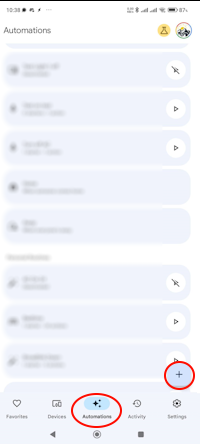
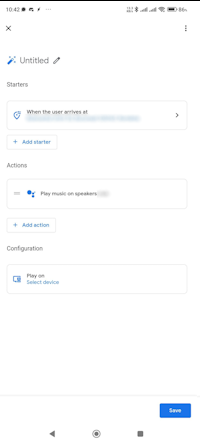
- First you need to set a new routine by going to the automation page and click on the + button:
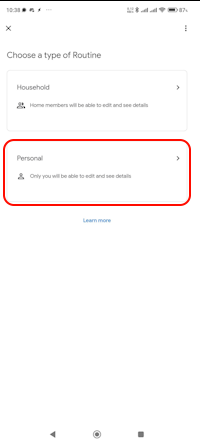
- Then select Personal from the type list:
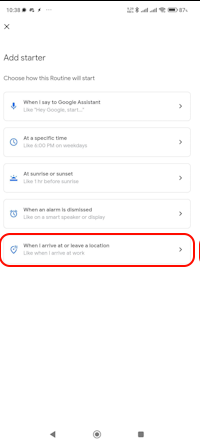
- Select “When I arrive to or leave a location”
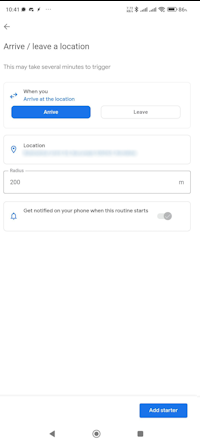
- Select your home location or other location and a radius, then click on “Add starter”:
- Add a custom action “Try adding your own” with the text “Play music on [selected speaker or group]” and click “Save”.
Also you may adjust volume on your speakers before playing music. (You can add other automations like turning on the light or the TV, etc.)
Household Routines version
For me this version works >90% of the time, but you’ll need a cheap smart bulb.
- I bought a cheap smart light from Calex (~5 euros in Romania) and set it up in the “Smart Life – Smart Living” app.
(Keep in mind that this works with Tuya / Smart Life compatible devices and applications, but you can achieve the same result with other manufacturers by using IFTTT + Tasker) - Configured an automation in Smart Life app that triggers the light to turn on when I enter a location.
You can also work with turning off the light when you leave home for different actions like stopping the music or turning off the AC remote control. - Connect the Smart Life account with google home.
- First you need to set a new routine by going to the automation page and click on the + button:
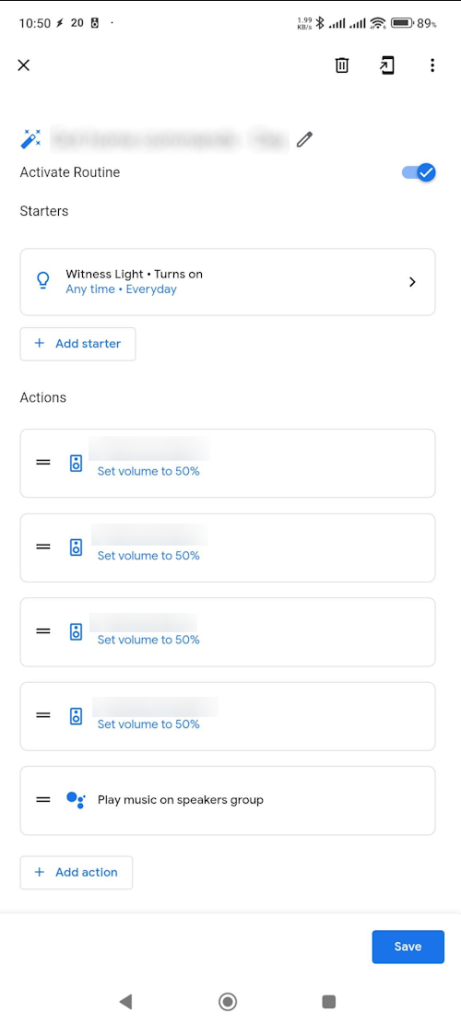
- Select Household routines then give it a name and add your starter “When a device does something”, select your light and check “Turn on or off” > Turns on.
- Add a custom action “Try adding your own” with the text “Play music on [selected speaker or group]” and click “Save”.
Also you may adjust volume on your speakers before playing music.
- Save it and enjoy!
Note
If you have issues with this routine, you may want to set an exception for battery optimisation in Android settings, or to lock the app for not being killed by the OS.
- I saw that this routine isn’t working all the time for me, so maybe Google will look into this and fix it.
Summary
Google Home is an essential tool for anyone looking to transform their home into a smart and connected space. It simplifies device management, automates tasks, and enhances overall home automation experience.